
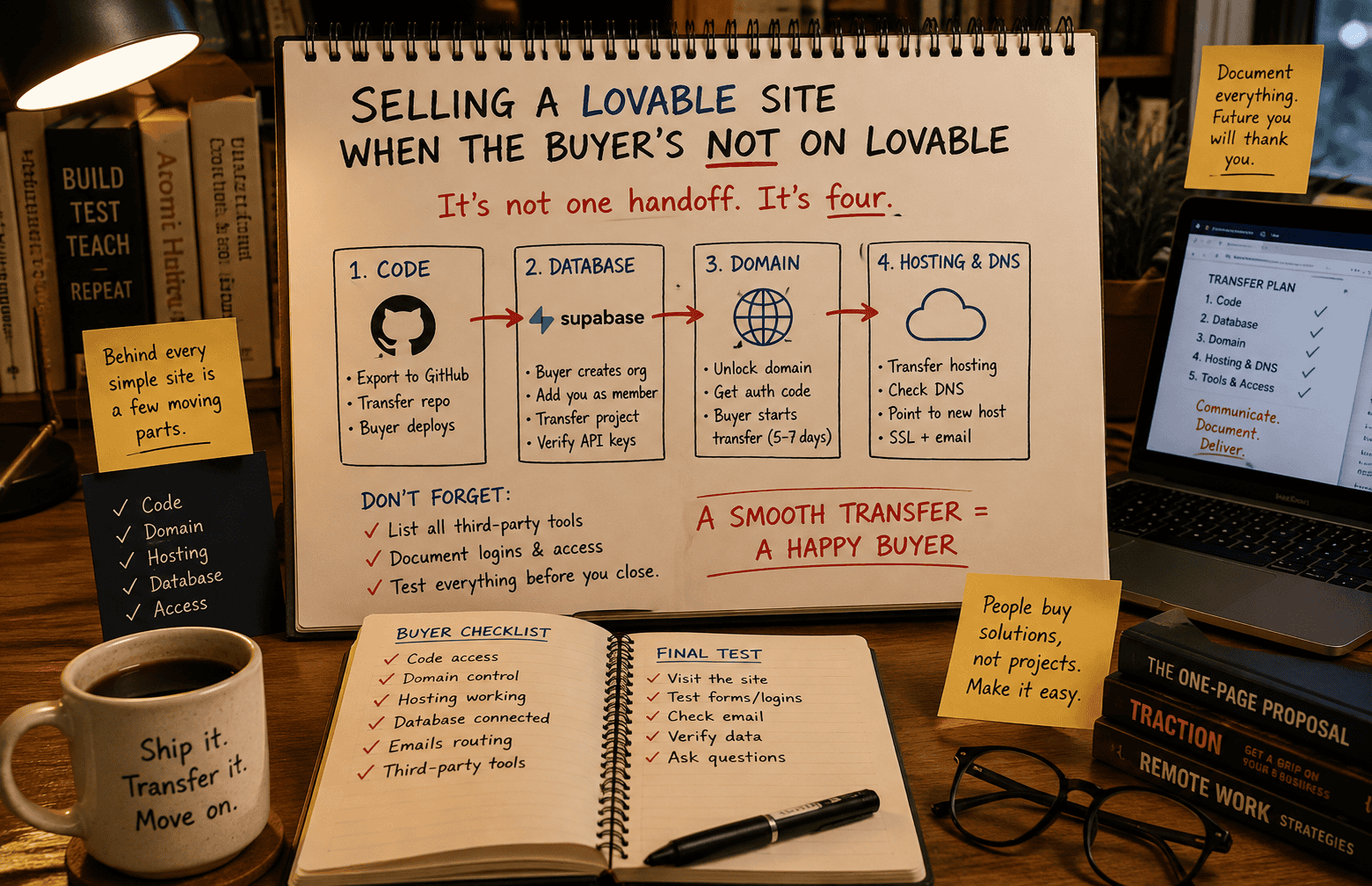
Selling a Lovable-built site to a buyer without a Lovable account means handing over the code, the domain, the hosting, and sometimes a database, as four separate transfers rather than one handoff.
I’m looking forward to building sites in Lovable and selling them. That part genuinely excites me.
But somewhere between “wouldn’t it be nice to flip a site for $500” and actually doing it, I ran into a gap. A lot of course material sells the dream like this: build a pretty site, buyer pays, you flip a switch, it’s theirs. Vibe coding makes the building part look effortless, and it kind of is. That’s exactly why it’s the part most beginner courses spend their time on. It’s the easy, demoable, screenshot-friendly piece.
Handing the site to a stranger who has never touched Lovable is a different problem. It’s also the part nobody puts on the sales page.
So I researched it properly, using more than one AI as a research assistant and cross-checking what came back against each other. I’m not writing this to talk anyone out of vibe-coded site flipping. I’m doing it myself. I just think you deserve the actual steps before you list your first site, not after a buyer has paid and is waiting on you.
What follows is the most basic version of the process: the one you’d follow if your buyer has no Lovable account and just wants a working, independent site.
Why the Lovable Transfer Button Doesn’t Work Here
Lovable’s built-in transfer option only works between people inside the same Lovable workspace. Fine for handing a project to a coworker, or a client already set up alongside you. Useless for a stranger who bought your site on Flippa and has never opened Lovable in their life.
So instead of transferring the project, you export the code and hand over the separate pieces that make the site run. That’s the shift most beginners don’t see coming. One product on your screen becomes three or four separate handoffs behind the scenes.
The Pieces That Actually Move
Before you list anything, write down what your specific site depends on. A simple content site is much lighter than one with logins, a database, or payment processing. At minimum, expect to account for:
- The code itself
- The domain name
- Wherever the site is hosted, and how DNS points to it
- A database, if the site stores or displays dynamic content
- Any third-party services the site connects to, like analytics or email tools
Each one lives in a different place, under a different account, on its own transfer timeline. A buyer who’s done this before will ask for this list right after the sale. Have it ready before you list.
Getting the Code Out
This is the easy part, and honestly the part closest to what beginner courses actually teach.
Inside your Lovable project there’s a GitHub connection option. Authorize it, and Lovable pushes your entire codebase into a new repository it creates for you. Components, styles, configuration, synced in seconds.
From there you have two options. Add the buyer as a collaborator, or transfer the whole repository to their GitHub account outright. A full transfer is cleaner. It severs your connection to the project once it’s done.
Once the code sits on GitHub, your Lovable subscription stops mattering. The buyer deploys from GitHub, not from Lovable.
The Database Question
If your site pulls in Supabase for storage, logins, or any dynamic content, that’s a separate transfer with its own quirks. Supabase does have a built-in ownership transfer feature, but it runs backwards from what you’d expect: the buyer creates their own Supabase organization first, adds you to it as a member, and only then can you initiate the transfer from your side. Supabase requires it that way for security reasons on their end.
Two things worth knowing. Moving a project between plans can cause brief downtime, so schedule it for a quiet traffic window rather than doing it on impulse. And once the transfer completes, someone needs to confirm the live site still points at the correct project URL and API keys. Mismatched keys break the whole application, and the mismatch isn’t always obvious at a glance.
If your first site is a simple content build with no login system and no dynamic database, you skip this step entirely. That’s one real reason to keep an early flip simple on purpose.
Where the Domain Goes
The domain is its own animal, separate from the code and separate from hosting.
You unlock it at your registrar and generate an authorization code, sometimes called an EPP code. That code goes to the buyer through a private channel, never posted anywhere public. The buyer starts the transfer on their end using it.
Expect five to seven days, sometimes longer. Registrars send confirmation emails during the process, and missing one can stall things, so check spam folders during this window. Once the domain lands in the buyer’s account, ICANN rules lock it from transferring again for sixty days. Worth telling the buyer up front so it doesn’t feel like a surprise restriction later.
Getting It Hosted Again
A GitHub repository holds code, not a live website. Someone still has to deploy it.
Most buyers deploy through Netlify or Vercel, connecting their own GitHub account to the repository you handed over. From there they set build settings and environment variables and get a live deployment, with future code changes able to push automatically once that pipeline exists.
DNS is the last piece, connecting the domain to the new hosting. The buyer updates nameserver settings once the domain transfer completes. DNS changes aren’t instant. Give it a day or two before assuming something’s broken.
The Loose Ends: Analytics, Keys, and Other Accounts
Anything tied to a third-party account needs its own conversation.
Analytics tools linked to your personal account shouldn’t get handed over wholesale. The buyer sets up their own, and you can offer to export historical data if they want a record of it.
Any API keys baked into the code during development, email tools, payment processors, anything, should be treated as compromised the moment you sell. The buyer generates fresh keys under their own accounts and those go into new environment variables, not the old ones riding along in your code.
Payment processors specifically don’t support account transfers. A buyer with a site that takes payments needs to set up their own merchant account and run a test transaction before calling the site live.
How Long This Actually Takes
Realistically, plan on one to two weeks from sale to a fully working handoff, depending on how many of these pieces your site involves. Domain transfers alone can eat five to seven days of that. A repository handoff is nearly instant. A database transfer needs coordination on both ends. Everything needs testing once it’s done.
A written handover checklist, shared with the buyer before you start, saves both of you a lot of back and forth. List the repository, the domain registrar and account email, the hosting provider, and where any API keys live. Share it through a private channel, not in the open.
Flippa’s escrow service is worth using through this window. Funds stay held until the buyer has had a real chance to test the site and confirm everything works.
Where I’m Starting
My own plan is to start with simple content sites and no database dependency at all, while I get comfortable with the GitHub and hosting side of this. Once that feels routine, a site with a Supabase backend is a smaller step from there, not a cliff.
That’s also just dig-your-well-before-you’re-thirsty thinking. Learn the plumbing on a site where nothing breaks if you get a step wrong, before you’re doing it under a buyer’s clock.
This post is part of the AI Survey series, where I take a hands-on look at different AI tools and how they actually perform for solopreneurs like me. Browse the full series →
What This Comes Down To
- A Lovable sale isn’t one handoff. It’s several, and each has its own account, its own timeline, its own way of going wrong.
- The code is the easy part. Export to GitHub and the buyer’s Lovable account requirement disappears entirely.
- A database, if your site has one, is where the real coordination lives. Skip it on your first flip if you can.
- The domain and hosting steps are mechanical but slow. Budget real days for them, not minutes.
- None of this is a reason to avoid this income path. It’s a reason to walk in knowing what a sale actually requires of you.
Questions Worth Asking Before You List
Can I transfer a Lovable project straight to a buyer inside Lovable itself?
Only if they join your Lovable workspace, which isn’t realistic for an arms-length buyer. Export the code to GitHub instead and transfer the repository from there.
Do I need to keep paying for Lovable after the site sells?
No. Once the code is exported to GitHub, the buyer deploys independently. Your Lovable subscription only matters during the building phase.
What happens if I forget to transfer the database?
The site breaks. Dynamic content disappears, logins fail, and the buyer sees errors across the site. A database transfer, if your site has one, isn’t optional.
Can a buyer back out if the transfer goes badly?
If you’re using Flippa’s escrow protection, generally yes, during the inspection window before funds release. One more reason to test everything thoroughly before calling the handoff complete.